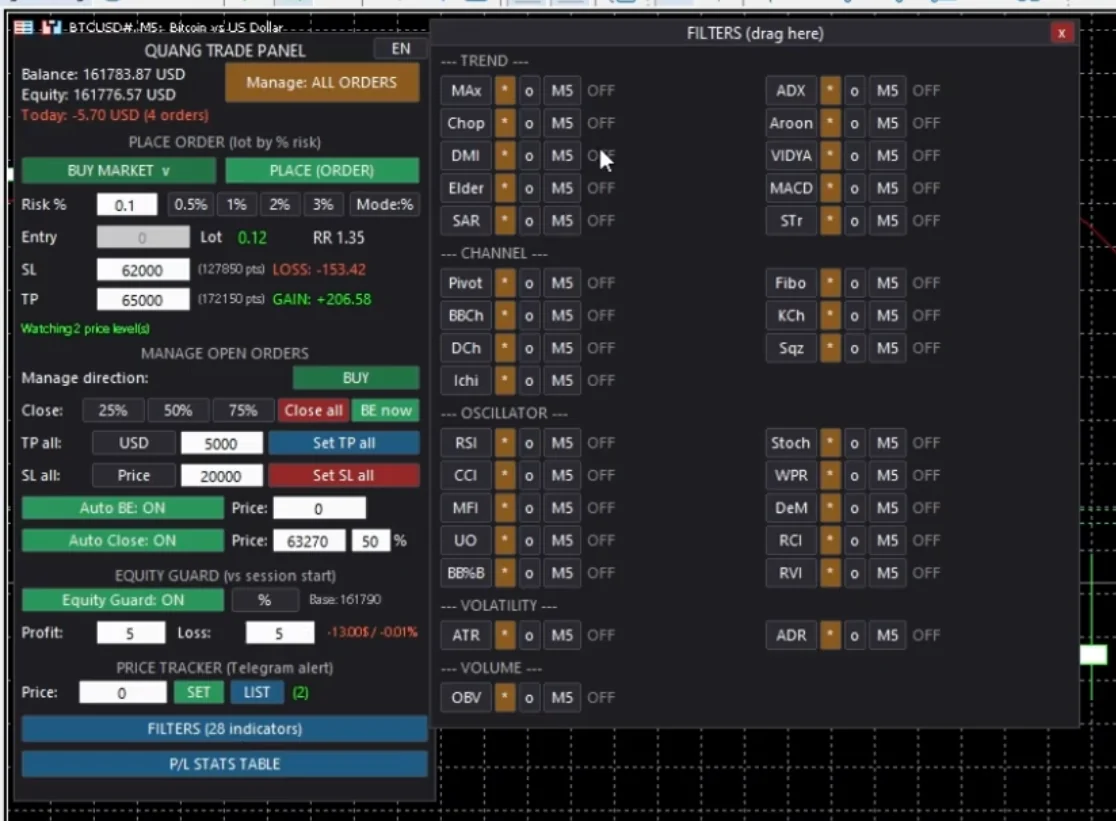
- Platform: MetaTrader 5 (MT4 not supported)
- License: 1 Key = 1 MT5 account at a time — buy once, use forever
- Demo account and backtest: run free, no key needed
- Language: Bilingual Vietnamese – English, switch with one button on the panel
All-In-One Order Management Tool for MetaTrader 5
Fast entry, auto-lot by risk %, manage order clusters with one click, plus 30 indicator filters and Telegram price alerts. Modular design, light footprint, no lag.
This is not a bot that enters orders for you. You still decide to enter — the panel handles the work: calculate, place right, close right ratio, protect when you step away.
🎯 Smart Order Entry
Auto-Calculate Lot by % Risk
Set how much account % you'll risk, the panel calculates lot from your actual SL — no calculator, no mental math during fast price moves.
See the Numbers Before You Click
Shows right there: money you might LOSE, money you expect to WIN, and Risk : Reward ratio. Decide by numbers, not gut feel.
Six Order Types in One Dropdown
Buy/Sell × Market – Limit – Stop in one dropdown, box changes color by side (blue = Buy, red = Sell). Pick Market and the Entry box grays out because the order fills at market price.
Block Backwards Orders
Put SL or TP backwards and the panel shows red "WRONG SL / WRONG TP" right there — catch the mistake before it hits the broker, not after.
🛡️ Manage Order Clusters
Close 25% – 50% – 75% by Total P/L
Close by the TOTAL floating P/L % of the cluster, not by volume. Up and close 50%, you lock in exactly , the other floats. Panel prioritizes closing orders far from price first, last order closes partly by ratio to hit your target.
Cluster TP Three Ways
Price — enter TP price, set the same for all orders. USD — enter target profit $, panel calculates the price the cluster hits that. BE+ — TP at break-even (average entry) plus/minus offset.
Cluster SL Three Ways
Price, USD (enter acceptable loss $, panel calculates the price), or Entry+ (SL at latest order entry plus/minus offset).
Auto Break Even & Auto Take Profit
Flip once, panel watches realtime and auto-pulls SL to break-even or auto-closes at threshold — each order gets a flag so no repeat on the same ticket.
Choose Range and Direction
QL: PANEL = panel orders only; MANAGE: ALL = all orders on current symbol, including manual ones. Add Buy/Sell filter button on every action: close %, BE, close all, cluster TP/SL.
💰 Equity Guard — Account Protection
Profit Exit & Loss Cut by Account
Set profit threshold and loss threshold by % or USD. Hit the threshold and panel closes the whole account — all positions and pending, any symbol any magic — with alert.
Baseline Resets Daily
Baseline equity locks when you open the panel and resets at midnight, so thresholds always run from session start, not some old number from last week. Set to 0 to disable that side.
📊 Real-Time P/L Stats
Daily P/L Calendar
Calendar shows daily P/L, total lot, and order count per day. Hover over a day for per-symbol breakdown. Jump to any month quickly.
Logs Manual Closes Too
Stats read from account deal history, so any close method goes in: close via panel, close by hand on terminal, or auto-hit SL/TP.
No History Rescan Every Time
Reads history once at startup then updates realtime with each new deal. Switch months and it shows instant, no MT5 reload wait.
📈 30-Indicator Filter Panel
Open with button "FILTER PANEL" on the main panel. Draggable panel, five groups:
Trend — 10 indicators
ADX, Choppiness, Aroon, DMI, VIDYA, Elder Ray, MACD, Parabolic SAR, Supertrend, MA Cross (mark arrows at crossover).
Price Channel — 7 indicators
Pivot High/Low with breakout levels, auto Fibonacci with Golden Pocket zone shaded like TradingView, Bollinger Channel, Keltner, Donchian, Squeeze, Ichimoku.
Oscillators — 10 indicators
RSI, Stochastic, CCI, Williams %R, MFI, DeMarker, Ultimate Oscillator, RCI, Bollinger %B, RVI.
Volatility & Volume — 3 indicators
ATR, ADR (average daily range) and OBV.
Each Indicator Has Its Own Timeframe
Turn on an indicator and it draws on chart, turn off and it vanishes. Indicators share handle with the value calculation so numbers on the panel always match the lines — multi-timeframe analysis without opening many charts.
Tweak Parameters Live
Change MA type, price type, period via dropdown right on the panel — no EA unload and reinstall.
Reference Only
Filter panel does not block order entry. It gives you the multi-frame picture to decide yourself, not refuse your order on its own.
🔔 Price Watch + Telegram Alert
Set Multiple Price Levels at Once
Price hits level and panel sends Telegram alert right away, notifies once then disables the level. List lives in a floating panel, delete any level easily.
⚙️ Setup
- Open MetaTrader 5 → File → Open Data Folder. This is the data folder, not the MT5 install folder.
- Quit MetaTrader 5 fully before overwriting, so EA and libraries don't lock.
- Unzip the package, copy the whole folder
MQL5to the folderMQL5you just opened, pick Replace for all. Package is built with the right folder tree — don't copy files one by one. - Go to
MQL5\Libraries\, right-click file.dll→ Properties, if there's a box Unblock then check it and OK. Windows often blocks downloaded files. - Reopen MT5, enable Algo Trading and check Allow DLL imports, then drag the EA onto the chart and enter your license key.